What is Kubernetes?
Kubernetes What is?, or K8s, is a well-known open-source platform that orchestrates container runtime systems across a cluster of networked resources. Kubernetes can be used with or without Docker.
Originally developed by Google, which needed a new way to run billions of containers per week at scale, Kubernetes was released as an open-source platform in 2014. It is now the industry-standard orchestration tool and market leader for deploying containers and distributed applications. As Google notes , “Kubernetes’ primary goal is to make it easier to deploy and manage complex distributed systems, while continuing to benefit from the enhanced usability of containers.”
Kubernetes places a set of containers into a pool that it manages on the same machine to reduce network overhead and increase resource efficiency. Examples of such a container pool include an application server, a Redis cache, or an SQL database. In the case of Docker containers, it’s one process per container.
Kubernetes is especially useful for DevOps teams , as it allows them to discover services, load balance across the cluster, automate deployments and rollbacks, automatically recover failed containers, and manage configurations. Furthermore, it’s a fundamental tool for building robust DevOps CI/CD pipelines .
However, Kubernetes is not entirely a Platform as a Service (PaaS) . Several factors must be considered when creating and managing Kubernetes clusters. The complexity of managing Kubernetes is one of the main reasons why many customers prefer to use managed Kubernetes services from cloud solution providers.
What is Docker?
Docker is a commercial containerization platform and container runtime that helps developers create, deploy, and run containers. It uses a client-server architecture with simple commands and automation through a single API.
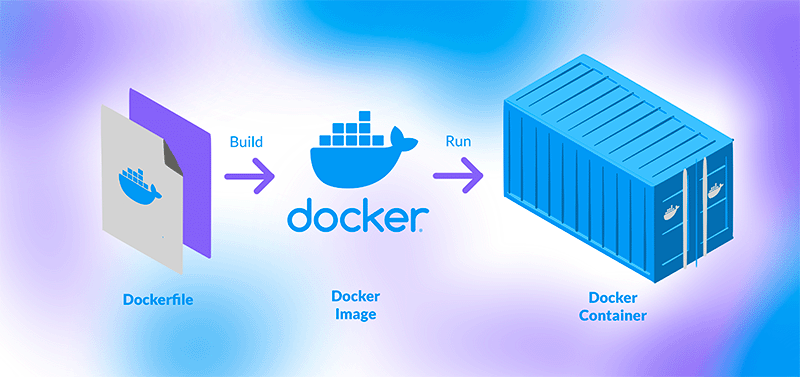
It also includes a toolkit typically used to package applications as immutable container images by writing a Dockerfile and then running the appropriate commands to create the image using the Docker server. Developers can create containers without Docker, but this platform simplifies the process. These container images can then be deployed and run on any platform that supports containers, such as Kubernetes, Docker Swarm, Mesos, or HashiCorp Nomad.
While Docker allows for efficient packaging and distribution of containerized applications, running and managing containers at scale using only this tool is complex. Some of the challenges include coordinating and scheduling containers across different servers and clusters, updating or deploying applications without downtime, and monitoring container health.
To solve these and other problems, container orchestration solutions were created, such as Kubernetes, Docker Swarm, Mesos, and HashiCorp Nomad, among others. These tools allow organizations to manage a large volume of containers and users, efficiently balance loads, provide authentication and security, perform cross-platform deployments, and more.
How is Kubernetes implemented?
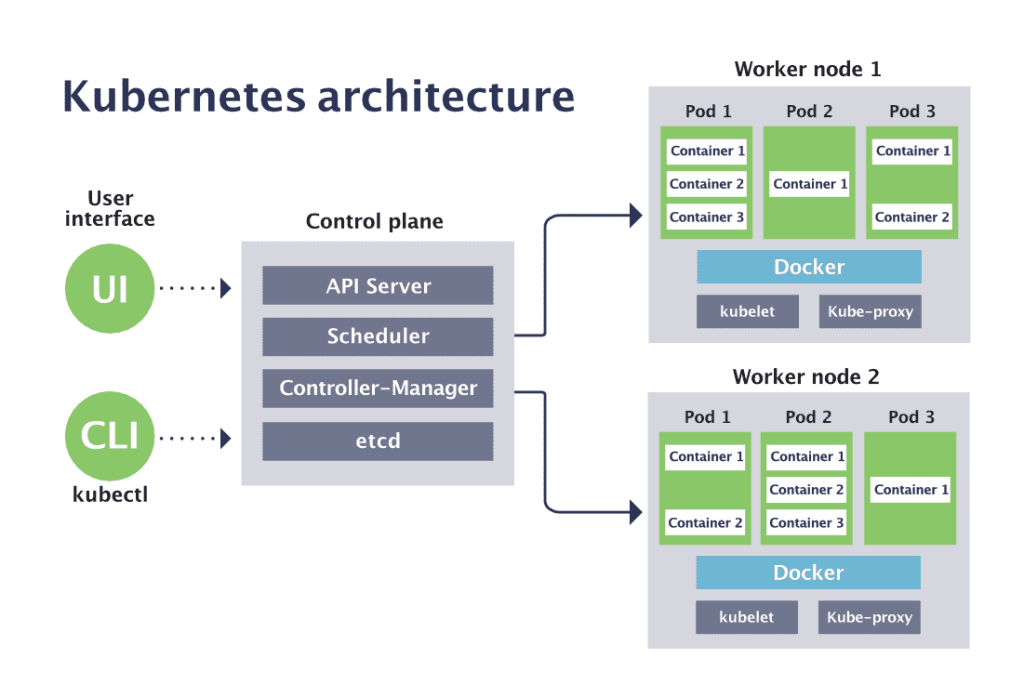
Here’s where things get more complicated, because each implementation, as I mentioned, is called a cluster, and each cluster has its own architecture. But let me show you with an infographic:
First, clusters operate through two types of nodes:
- The master nodes .
- The worker nodes .
The worker nodes are where the application actually resides, and the master node is responsible for communication, automation, managing all processes, and always being operational.
So, on the master node, we have several services. For example, kube-scheduler, which executes scheduled tasks at regular intervals; kube-apiserver , which handles communication between nodes; kube-control-manager, which manages the cluster; and the database connection. All of this takes place on the master node.
Now, the worker nodes are where the applications actually reside within Kubernetes, and each one has a service called a kubelet, which communicates with the master node ‘s API server , allowing them to connect. Additionally, each worker node contains a pod. This pod is the application, and within that pod are the Docker containers, which are the application’s dependencies. So, we have application dependencies, the application itself (which is the pod), the kubelet (which is the communication service), and then all the worker nodes connect to the master node.
Now, this allows us to scale applications vertically or horizontally. Horizontal scaling would mean adding more pods as needed, and vertical scaling would mean adding more clusters. The important thing is that we now have much more organized management of our microservices. But as you can see, this is already a fairly advanced topic in software architecture, so if you want to master it further, I invite you to our Kubernetes course at EDteam.
Advantages of Kubernetes
Kubernetes, often described as “the Linux of the cloud,” has good reason to be the most popular container orchestration platform. Here are a few:
Automated operations
Kubernetes includes a powerful API and command-line tool called kubectl, which handles many of the heavier container management tasks by automating operations. The Kubernetes controller pattern allows applications and containers to run exactly as specified.
Infrastructure abstraction
Kubernetes manages the resources you make available to it. This allows developers to focus on writing application code and forget about the underlying compute, networking, or storage infrastructure.
Monitoring the status of services
Kubernetes monitors the running environment and compares it to the desired state. It performs automatic health checks on services and restarts containers that have failed or stopped. Kubernetes only makes services available when they are running and ready.
Comparison between Kubernetes and Docker
Docker is a container runtime, while Kubernetes is a platform for running and managing containers across multiple container runtimes. Kubernetes supports numerous container runtimes, such as Docker, containerd, CRI-O, and any Kubernetes CRI (Container Runtime Interface) implementation. Kubernetes could be thought of as an “operating system,” and Docker containers as the “applications” installed on it.
Docker alone is highly beneficial for modern application development and solves the classic “it works on my machine, but not on others” problem. The Docker Swarm container orchestration tool can manage the deployment of a production container-based workload consisting of multiple containers. As a system grows and needs to add many interconnected containers, Docker can independently address some of the growing challenges that Kubernetes helps solve.
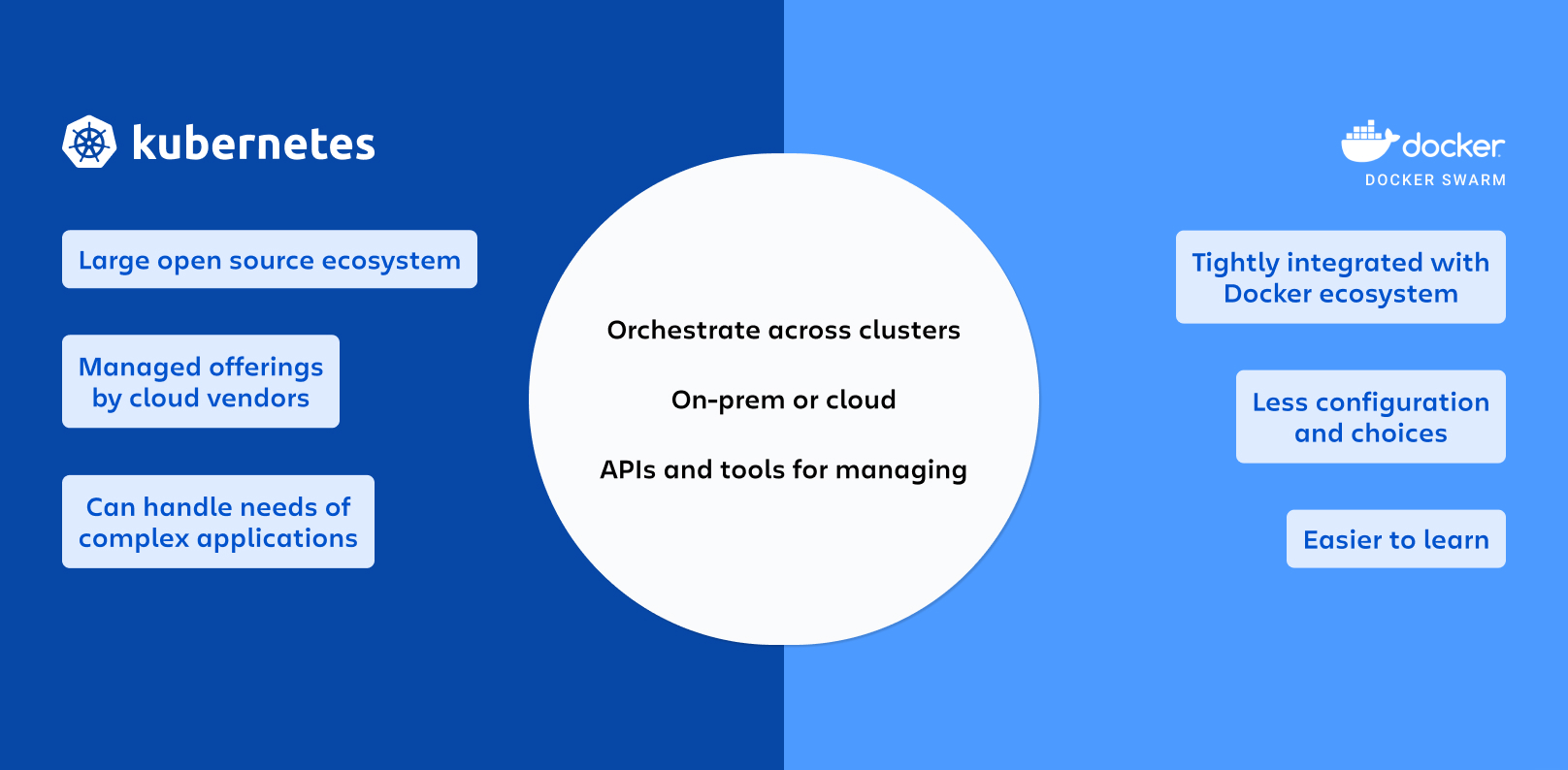
When comparing these two tools, it’s best to compare Kubernetes with Docker Swarm. Docker Swarm, or Docker’s swarm mode, is a container orchestration tool like Kubernetes, meaning it allows you to manage multiple containers deployed on different hosts running the Docker server. Swarm mode is disabled by default and must be installed and configured by a DevOps team.
Kubernetes orchestrates clusters of machines to work together and schedules containers to run on those machines based on available resources. Containers are grouped into pods, the basic unit of Kubernetes, through a declarative definition. Kubernetes automatically manages tasks such as service discovery, load balancing, resource allocation, isolation, and scaling pods vertically or horizontally. It has been adopted by the open-source community and is now part of the Cloud Native Computing Foundation. Amazon, Microsoft, and Google offer managed Kubernetes services on their cloud computing platforms, significantly reducing the workload of running and maintaining Kubernetes clusters and their containerized workloads.
5 key differences between Kubernetes and Docker
Kubernetes and Docker are both open source technologies, but they work in fundamentally different ways.
Next, we’ll explore the five fundamental differences between Kubernetes and Docker:
#1. Functionality and scope
Docker is a containerization platform for developing, deploying, and managing individual containers.
But Kubernetes is a way to orchestrate containers, or simply a tool for managing a group of containers. It coordinates the placement, scaling, and recovery of application containers across a cluster of hosts. Kubernetes provides developers with a platform on which they can easily create and manage extremely complex applications, which can consist of hundreds of microservices communicating with each other.
#2. Scalability and load balancing
Docker can load balance its containers, but it’s limited to a single machine. It doesn’t have the ability to scale those containers by default. Developers are forced to use other tools, such as Docker Swarm, for orchestration, which isn’t common practice for most businesses.
Kubernetes is good because it scales. It can increase or decrease the number of containers running at any given time based on demand. This elasticity ensures that applications remain responsive during traffic spikes, but also allows applications to use resources efficiently by scaling down during periods of low demand. Kubernetes has its own load balancing, so no single container is overloaded with network traffic and all run at optimal capacity.
#3. Self-repair capabilities
Docker does not have native self-healing capabilities. If a container fails or crashes, it requires manual intervention, or third-party tools must restart or replace it.
Kubernetes, however, includes robust self-healing capabilities. It monitors the health of containers and, if they fail, automatically restarts or reschedules them. This enables very high availability and reduced downtime for applications. It persists in the states where users want to remain.
#4. Networks and service discovery
Docker containers can only communicate with each other and with the host. However, managing complex network scenarios requires a lot of work.
Kubernetes has excellent built-in networking features, such as service discovery and load balancing. Its microservices architecture simplifies communication between services by managing all traffic routing to containers.
#5. Ease of use
Users have complained that Docker’s documentation needs updating and that it’s easy to fall behind on platform updates. Docker is easy to learn, but it lacks slicing capabilities, making its containers prone to various vulnerabilities. Container orchestration is not possible when managing multiple Docker containers simultaneously. Kubernetes is expensive to run and can have unpredictable cloud spending. It has a steep learning curve, meaning beginners must invest a significant amount of time to learn it. Access to its advanced features requires paying for additional services. Kubernetes is also known for its increasing complexity, but Docker falls short in terms of customization and automation capabilities.
Docker or Kubernetes: which one is right for you?
Since both Docker Swarm and Kubernetes are container orchestration platforms, which one should you choose?
Docker Swarm is generally faster to install and requires less configuration than Kubernetes if you build and run your own infrastructure. It offers the same advantages as Kubernetes, such as deploying applications through declarative YAML files, automatically scaling services to the desired state, load balancing across cluster containers, and controlling security and access across all your services. If you run few workloads, don’t mind managing your own infrastructure, or don’t need a specific Kubernetes feature, Docker Swarm can be an excellent choice.
Kubernetes is more difficult to set up initially, but it offers greater flexibility and more features. It also has extensive support from an active open-source community. Kubernetes offers several out-of-the-box deployment strategies, can manage incoming network traffic, and provides container observability capabilities. Major cloud service providers offer managed Kubernetes services that make it much easier to start using cloud-native features like autoscaling. If you run many workloads, require cloud-native interoperability, and have many teams in your organization (which necessitates better service isolation), Kubernetes is the ideal platform for you.
Compass and container orchestration
Regardless of the orchestration solution you choose, it’s important to use a tool to manage the complexity of your distributed architecture as you scale. Atlassian Compass is an extensible developer experience platform that brings together in one centralized, searchable location information about engineering processes and team collaboration. In addition to helping you control the scaling of your microservices with the Component Catalog , Compass can help you establish best practices and assess the health of your software with dashboards , as well as provide actionable data and insights across your entire DevOps toolchain through extensions built on the Atlassian Forge platform .