WHAT IS GPU-ACCELERATED COMPUTING?
What is GPU: GPU-accelerated computing is the use of a graphics processing unit (GPU) alongside a CPU to accelerate the performance of deep learning, analytics, and engineering applications. Today, GPU accelerators, an innovation from NVIDIA back in 2007, enable energy-efficient data center operations in government labs, universities, enterprises, and small and medium-sized businesses worldwide. They play a crucial role in accelerating applications across platforms ranging from artificial intelligence to automobiles, drones, and robots.
HOW GPUS ACCELERATE SOFTWARE APPLICATIONS
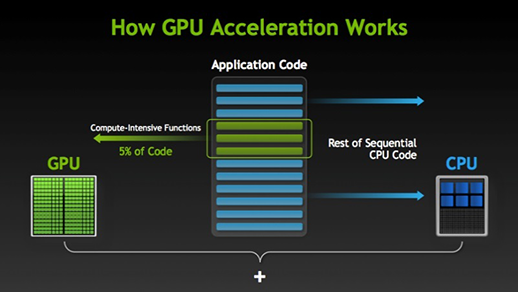
GPU-accelerated computing allows the GPU to handle the most computationally intensive aspects of an application, while the rest of the code runs on the CPU. From the user’s perspective, applications run much faster.
GPU performance vs. CPU performance
A simple way to understand the difference between a GPU and a CPU is to compare how they process tasks. A CPU has a few cores optimized for sequential serial processing, while a GPU has a massive parallel architecture consisting of thousands of smaller, more efficient cores designed to handle multiple tasks simultaneously.
Whether it’s gaming, video editing, productivity, or complex AI experiences , today’s computing systems are being pushed harder than ever. CPUs, GPUs, and NPUs have different functions and source points.
What is a CPU?
Built with billions of transistors, the central processing unit (CPU) can have multiple cores and is commonly referred to as the “brain” of the computer. It is essential to all modern computer systems, as it executes the instructions and processes that the computer and operating system need. The CPU is also important in determining how quickly programs can run while performing tasks such as browsing the internet, performing physics calculations for games and other programs, or creating spreadsheets.
What is a GPU?
What is GPU? The graphics processing unit (GPU) has many smaller, specialized cores. These cores deliver tremendous performance by working together and dividing processing tasks among many cores simultaneously (or in parallel). The GPU excels at highly parallel tasks, such as rendering images during gameplay, manipulating video data during content creation, and calculating results in intensive AI workloads.
What is the difference between a CPU and a GPU?
What is GPU differ from CPU: CPUs and GPUs have a lot in common: both are critical computing engines, both are silicon microprocessors, and both handle data. But CPUs and GPUs have different architectures and are built for different purposes.
The CPU is well-suited for various tasks, especially those where latency or per-core performance is critical. As a powerful execution engine, the CPU focuses its limited number of cores on specific tasks and speed. Therefore, it is highly effective for tasks such as serial computing, where only one task is executed at a time on a single processor, or database management.
GPUs began as application-specific integrated circuits (ASICs) designed for specialized purposes, such as accelerating graphics and 3D rendering tasks, for example, in gaming. Over time, these engines with fixed functions have become more programmable and flexible. While their primary function remains focused on the increasingly realistic graphics and visuals of gaming, GPUs have evolved into more general-purpose parallel processors capable of running many tasks simultaneously to handle an ever-growing variety of applications, including AI.
Today, it’s no longer a matter of choosing between a CPU and a GPU. Now more than ever, you need both to meet your diverse computing demands. The best results are achieved when you use the right tool for the job. What is GPU.
How about a combination of CPU and GPU?
Some CPUs include a GPU on the same chip, providing integrated graphics and other benefits. This combination of CPU and GPU eliminates the need for additional dedicated or separate graphics. It’s often used in devices where compact size and energy efficiency are important, such as laptops, tablets, smartphones, and some desktop computers.
CPUs with integrated GPUs offer space, cost, and energy efficiency benefits compared to dedicated graphics processors. They also provide the necessary power to process graphics-related data and instructions for everyday tasks. Processors with integrated graphics are ideal for gaming, media streaming, and light video editing.
Accelerating deep learning and AI
Currently, some CPUs also feature neural processing units (NPUs), which work directly with GPUs on the processor to perform the kind of high-performance inference tasks that AI requires. These specialized processors accelerate AI tasks and are ideal for preparing pre-trained neural networks for the AI inference phase, where the capabilities learned during training are used to make predictions. As AI becomes more prevalent, the combination of NPUs and GPUs will become a cornerstone of future computing systems.
With sufficient RAM, the CPU, NPU, and GPU processor provides a large testing ground for deep learning and AI.
Decades of leadership in CPU development
Intel has a long history of CPU innovation, having started in 1971 with the introduction of the 4004, the first commercial microprocessor fully integrated on a single chip.
Today, our CPUs enable a range of scalable AI experiences on the well-established x86 architecture. Whether you need high-performance Intel® Xeon® Scalable processors in the data center and cloud, low-power Intel® Core™ Ultra processors at the edge, or our other options, we have a CPU to help you achieve your goals.
Intel® Core™ Ultra Processors
Our premium architecture, the Intel® Core™ Ultra processor, delivers optimal energy efficiency and performance. Intel® Core™ Ultra processors contain an integrated NPU, while some models feature integrated Intel® Arc™ GPUs. The result is a single processor that allows users to experience extreme AI acceleration, immersive gaming, and 4K media consumption.
Intel® Core™ Processors (14th Generation)
Intel® Core™ (14th generation ) processors leverage hybrid performance architecture, with faster Performance-cores (P-cores) and a greater number of Efficient-cores (E-cores), and feature industry-leading tools to enhance performance and multitasking capabilities.
Certain laptops equipped with Intel® Core™ (14th generation) processors may include Intel® Iris® Xe graphics or our latest high-performance graphics solution, the Intel® Arc™ GPU , which enables built-in machine learning, graphics acceleration, and ray tracing hardware in laptops, desktops, and professional workstations.
Options with discrete GPU
We offer two discrete GPU options.
- The Intel® Arc ™ GPU lineup includes high-performance graphics solutions that let you create engaging content, captivate audiences, and supercharge your gaming experience. Intel® Arc™ GPUs enable built-in machine learning, graphics acceleration, and hardware ray tracing in laptops, desktops, and professional workstations.
- The Intel® Data Center GPU supports emerging technologies such as AI, rendering, analytics, and simulations. It also adds powerful parallel processing capabilities to data center CPUs.
From CPU and GPU to hybrid system
Whether you’re looking to enhance your gaming, bring your creative ideas to life, or explore the world of deep learning, Intel® processors with integrated graphics deliver the CPU and GPU capabilities you need for a superior computing experience. If you want to add graphics support to your Intel® processor-powered devices or data centers, our discrete GPU options are ready to enable acceleration and parallel processing capabilities.
GPU vs CPU: Main Differences
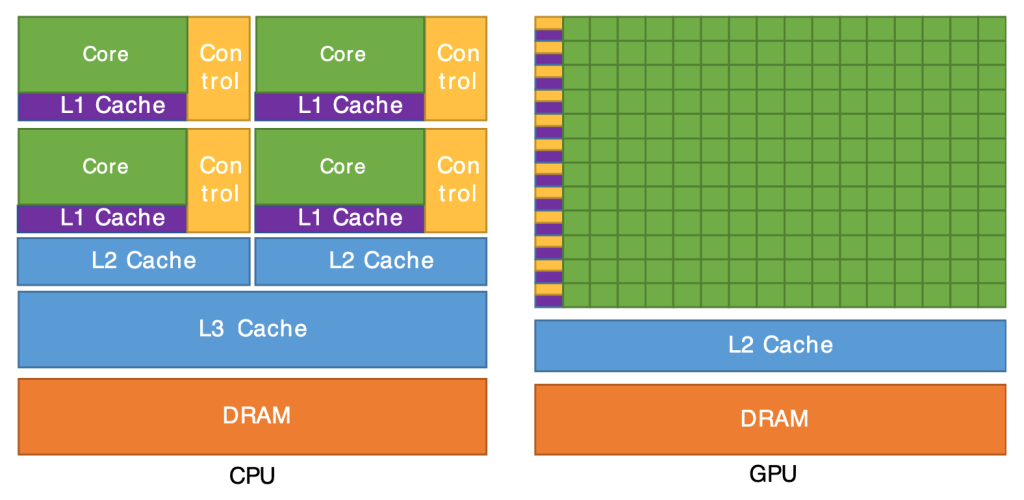
A GPU (Graphics Processing Unit) is a processor designed to perform complex visual and mathematical calculations, such as those required in graphics or machine learning. On the other hand, a CPU (Central Processing Unit) is a general-purpose processor that handles a wide range of tasks, including application management, data processing, and system-related operations.
Which is faster, a GPU or a CPU?
GPUs are generally faster for tasks requiring parallel processing and handling large volumes of data. This is due to their high number of processing cores. However, CPUs are more efficient at tasks that require sequential processing or encompass a wider range of functions.
Can you use a GPU for general tasks?
Yes. GPUs can perform general-purpose computing, but they are optimized for specific tasks such as array processing or parallel data processing. To take advantage of a GPU for general tasks, it’s key to optimize the code according to its architecture.
Is a CPU enough for machine learning?
For simpler tasks or with small datasets, a CPU may be sufficient. However, GPUs are better suited to handle the massive data loads and parallel processing required by machine learning.
What is most important for video rendering?
Both are essential. The GPU plays a primary role handling graphics and effects, while the CPU manages general functions and runs software. In general, a powerful GPU can significantly speed up rendering times and improve rendering results.
How to choose between a GPU and a CPU for an application?
It depends on your needs. If your application requires massive parallel data processing, a GPU will be the best option. If you need to work on more varied or sequential tasks, a CPU is more appropriate. Also, consider your budget and compatibility with your system.
Can I upgrade my CPU or GPU?
Yes, it’s possible to upgrade most CPUs and GPUs. Replacing a CPU may also involve upgrading the motherboard, while changing a GPU usually requires installing a new graphics card. Before doing so, be sure to check compatibility with your system.
How to optimize code for a GPU?
Optimization includes identifying code snippets where parallelism can be applied, using tailored algorithms, and minimizing data transfers between the CPU and GPU. Specialized tools such as GPU libraries and performance analysis software can help.
Limitations of GPUs compared to CPUs
GPUs can be less efficient in tasks involving many conditional branches or varied demands. Furthermore, they require specific hardware and software support, which can complicate their use in certain situations.
Examples of applications that use GPUs
- Games.
- Video rendering and editing.
- Machine learning and artificial intelligence applications.
- Scientific simulations.
- Data analysis in industries such as finance or health.
Factors to consider when choosing a GPU for your system
- Intended use: Gaming, 3D design, or machine learning? Each workload may require a different GPU.
- Compatibility: Make sure the GPU is suitable for your hardware and operating system.
- Energy consumption and cooling: These factors affect overall performance.
- Budget: Balance cost and performance according to what you need to execute.
Can your application benefit from a GPU?
Analyze the nature of your tasks. If they involve large amounts of data and parallel processing, a GPU can make a significant difference. However, also consider the costs and the required hardware/software support.
First steps in GPU programming
Start by learning a compatible language such as C++ (for CUDA) or C (for OpenCL), and install the necessary tools and drivers. Familiarize yourself with the available libraries for the framework you’re using and make sure you have a suitable GPU for testing.
The technical specifications mentioned are optional and may vary depending on the model. Furthermore, product customization may not be available in all countries. This is all about What is GPU.